
Tuya powers millions of IoT devices—from smart plugs and lighting to HVAC systems, sensors, and commercial equipment. While end users interact with these devices through apps like Tuya or Smart Life, product teams often need deeper access: device data, remote control, automation workflows, and integration with custom systems.
This is where the Tuya Cloud API comes in.
At a basic level, integrating Tuya Cloud API is straightforward. You can authenticate, query devices, and send control commands within a short time.
However, in real-world projects, integration quickly becomes more complex.
Once your system involves multiple devices, users, and business workflows, challenges often extend beyond API calls into areas like system architecture, permission control, and data synchronization.
This guide explains how Tuya Cloud API works, including authentication, device queries, and command execution. More importantly, it highlights the architectural considerations you need to build a reliable production system—not just a working demo.
If you are planning a production-level integration, you may also need to consider how to design a scalable system. You can explore this in our guide on multi-tenant architecture and enterprise integration.
If you are looking to implement Tuya Cloud API in your product, our Tuya IoT Cloud Integration Services can help you design and build a scalable solution tailored to your business.
What Is Tuya Cloud API?
Tuya Cloud API is the cloud-based interface that lets developers access Tuya’s IoT platform using standard HTTPS requests. It is designed for:
- Retrieving device data
- Querying status and events
- Sending control commands
- Integrating Tuya devices into third-party apps or platforms
- Building full IoT dashboards or automation systems
Tuya Cloud API is commonly used for Tuya API integration in enterprise dashboards, automation systems, and custom IoT platforms. It’s important to distinguish cloud APIs from other Tuya integration methods:
| Integration Method | What It Does | When to Use |
|---|---|---|
| Tuya Cloud API | Cloud-based device management and control | Mobile apps, dashboards, enterprise IoT |
| LocalTuya / Home Assistant | Local LAN control | Hobbyists, offline control |
| Tuya Panel SDK | Custom UI inside OEM App | Brand-facing mobile experiences |
| Embedded SDK / MCU SDK | Device-level control | Hardware customization & firmware |
The Cloud API is ideal when your application requires multi-device management, analytics, remote control, or needs to connect Tuya devices to other cloud systems like building management apps, property software, energy dashboards, automation platforms, or n8n workflows.
Tuya Cloud API Architecture and Core Concepts
High-Level Architecture
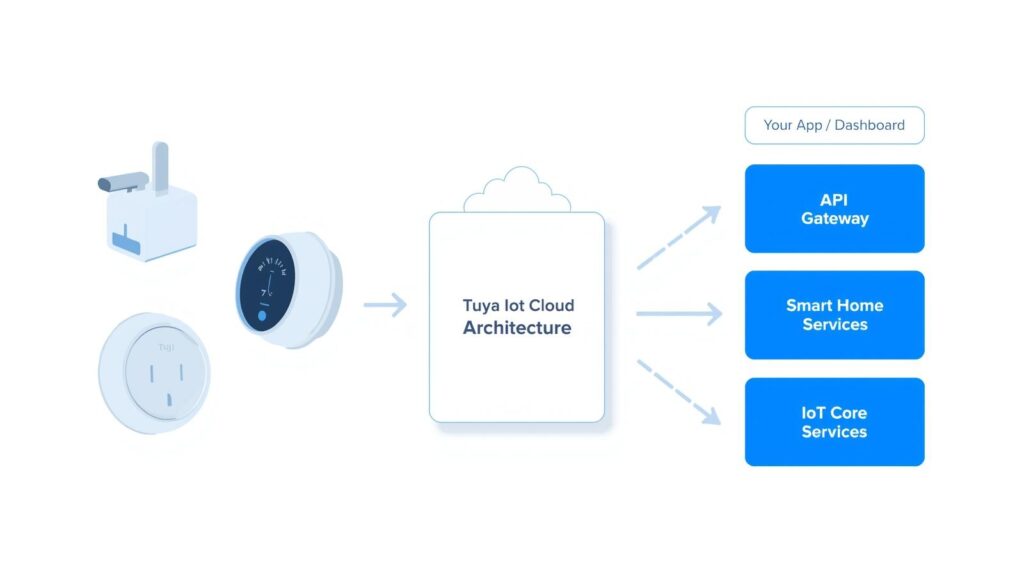
At a high level, Tuya Cloud API gives you access to the capabilities of the Tuya IoT Cloud:
- IoT Core Services – device lifecycle, metadata, DP status
- Smart Home Services – home/room/user-level organization
- Premium Services – video, scenes, automation, OTA upgrades
- OpenAPI Gateway – REST endpoints for developers
Your Cloud Project determines the scope of what APIs you can access.
Key Concepts You’ll Encounter
Cloud Project
A workspace that contains permissions, linked services, and devices.
Access ID / Access Secret
Credentials used to sign API requests.
Data Center (Endpoint)
Tuya Cloud is region-based. You must call the correct endpoint (US, EU, India, etc.) based on your project settings.
Device & DP (Data Point)
All Tuya functions—switches, brightness, temperature—are represented as DP codes.
Example:{ "code": "switch", "value": true }
User Linking
In consumer scenarios, the Tuya or Smart Life app user must be linked to your cloud project to access their devices.
Getting Started: Creating a Tuya Cloud Project and Enabling APIs
Step 1: Create a Cloud Project
Inside the Tuya IoT Platform → Cloud → Development:
- Create a new Cloud Project
- Choose your industry type
- Select the correct data center (critical for API calls)
Step 2: Add Required Cloud Services
To access device data and control capabilities, enable at least:
- Smart Home Basic Service
- Device Status Notification
- (Optional) Industry Services if your hardware belongs to commercial solutions
If these services aren’t added, you will receive no-permission or 28841105 errors.
Step 3: Link Devices to the Cloud Project
Tuya or Smart Life app devices must be bound to the same account used in your Cloud Project.
You can link app users under Project → Link Device → App Account Linking.
Step 4: Get Your API Credentials
Once your cloud project is ready, copy:
- Access ID
- Access Secret
- API Endpoint URL (per region)
Tuya Cloud API Credentials: Access ID, Access Secret, and Endpoint URL
To call the Tuya Cloud API, you need three key pieces of information from your Cloud Project:
- Access ID – Identifies your cloud project.
- Access Secret – Used together with the Access ID to generate request signatures.
- Endpoint URL – The base URL for your project’s data center (for example, US, EU, or India).
You can find these values in the Tuya IoT Platform under Cloud → Development → Your Cloud Project → Overview or Settings.
The Access ID and Access Secret are used in two critical places:
- Token requests – When you call the token endpoint, the request headers must include a signature generated from your Access ID, Access Secret, and timestamp.
- All subsequent API calls – Each request must be signed so that Tuya Cloud can verify the caller and ensure the request has not been tampered with.
The endpoint URL must match the data center selected for your project. If you call the wrong endpoint (for example, using an EU URL for a US project), your requests will fail even if the credentials are correct.
For security, never hardcode the Access Secret in client-side code or mobile apps. Keep these credentials on the server side or in a secure secrets manager, and rotate them if you suspect they have been exposed.
Calling Tuya Cloud API: From Authentication to Device Control
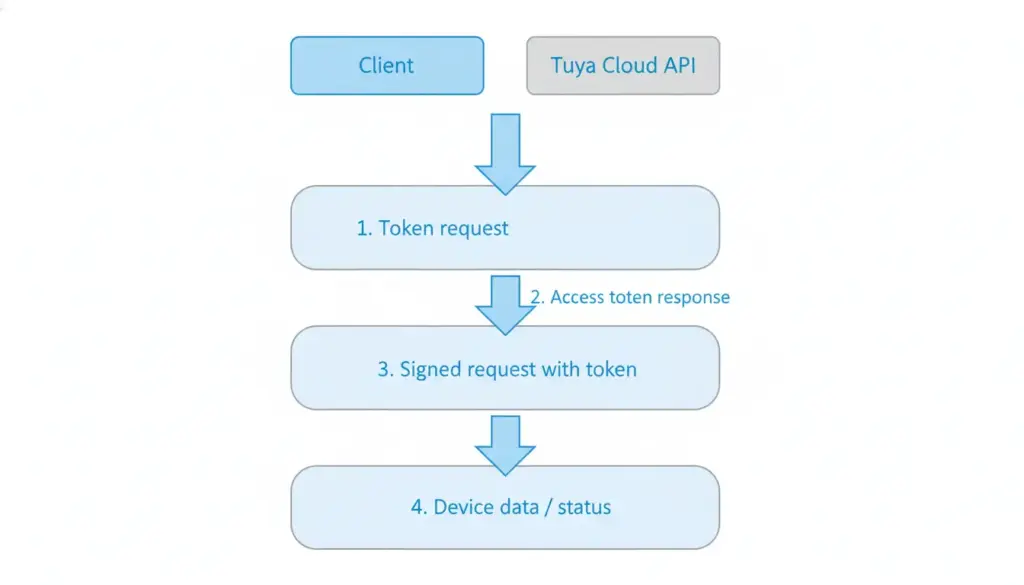
Tuya uses a token-based authentication system combined with request signatures to ensure secure communication between your application and the Tuya IoT Cloud. Every API request must first obtain a valid access token, and subsequent calls must include a timestamp and a cryptographic signature generated using your Access ID and Access Secret.
At a basic level, this workflow is straightforward. However, in production environments, the complexity increases significantly.
You are not just handling API calls—you are managing authentication lifecycle, concurrency, and system stability across potentially thousands of devices and users.
Below is the essential workflow that all Tuya Cloud API integrations follow.
1. Get an Access Token
Make a POST request to:
/v1.0/token?grant_type=1The response contains:
access_tokenexpire_timeuid(linked user ID)
You must include signed headers in each request:client_id, t (timestamp), sign, and optionally sign_method.
Pro Tip: Access tokens expire every 2 hours. While a simple refresh loop may work for testing, production systems must handle token caching, expiration synchronization, and concurrent requests across services.
Without proper design, token refresh conflicts can lead to failed requests, service interruptions, or rate limiting issues.
👉 For enterprise systems, token management is usually handled as part of a centralized backend service or integration layer.
2. List Devices
GET /v1.0/devicesReturns device IDs, names, categories, and online status.
In real deployments, device lists are rarely static. Systems must handle device onboarding, grouping, reassignment, and synchronization with internal asset or customer models.
3. Get Device Status
GET /v1.0/devices/{device_id}/statusReturns all DP codes and current values.
Example return:
[
  {"code": "switch", "value": true},
  {"code": "bright_value", "value": 70}
]
In enterprise scenarios, device status data is often not consumed directly. It needs to be mapped into business context (tenant, location, asset type) and integrated into monitoring, alerting, or analytics systems.
4. Send Commands to a Device
POST /v1.0/devices/{device_id}/commandsExample body:
{
  "commands": [
    { "code": "switch", "value": false }
  ]
}
Tuya Cloud executes the command and returns the result.
However, command execution in production systems often requires additional layers such as permission validation, audit logging, retry mechanisms, and failure handling to ensure reliability and traceability.
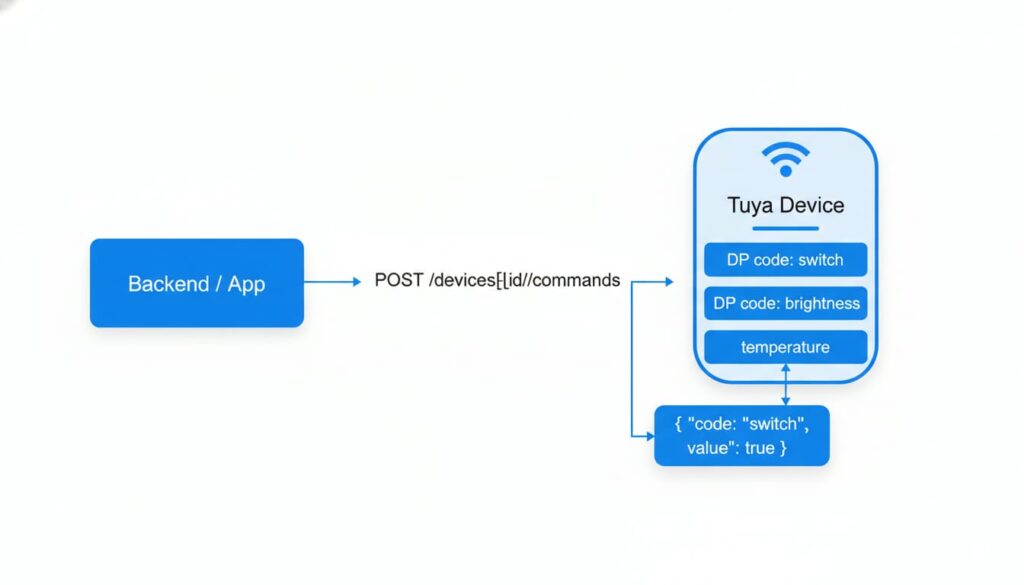
This workflow applies to most device types—lighting, sensors, thermostats, plugs, energy meters, and more.
But in practice, building a stable system around this workflow requires more than just calling APIs.
It requires a well-designed architecture to manage device relationships, permissions, and data consistency across your platform.
👉 This is where many teams move beyond simple API integration and start working with a Tuya IoT Development Services Company to design a scalable system.
Real-World Use Cases for Tuya Cloud API
Although many tutorials focus on Home Assistant or LocalTuya, most of our clients use Tuya Cloud API to build commercial and enterprise IoT systems.
Here are the scenarios where Cloud API is well-suited. These examples show how Tuya API integration is used in real commercial and enterprise IoT systems.
This article focuses on cloud-based and commercial IoT integrations using the Tuya Cloud API. If your main goal is a local-only or Home Assistant setup, Tuya Cloud API might not be the best fit, and tools like LocalTuya or LAN-based integrations are usually more appropriate.
Smart Home & Open-Source Integrations
- Connect Tuya with Home Assistant for unified dashboards
- Control devices through n8n automation recipes
- Use LocalTuya for LAN-based low-latency control
These are great for makers or home users but not usually suitable for commercial deployments.
Commercial IoT Use Cases (Where Tuya Cloud API Shines)
1. Smart Building & Office Automation
- Centralize control of HVAC, lighting, sensors, and locks
- Sync device data into a building management dashboard
- Build custom access rules, alerts, or energy-saving automations
2. Retail & Chain Stores
- Monitor store environment (temperature, humidity, lighting)
- Automate business rules based on sensor data
- Push alerts for device failures or abnormal energy usage
3. Energy & Power Monitoring
- Fetch real-time energy consumption from Tuya meters
- Build dashboards for trend analysis
- Trigger load shedding or smart energy-saving workflows
4. IoT Operations & Remote Device Management
- Pull thousands of device statuses via API
- Reset, reconfigure, or run diagnostics remotely
- Combine cloud API with local gateways for redundancy
Limitations of Tuya Cloud API (and When You Need More)
While Tuya Cloud API is powerful, relying on it alone often leads to limitations in production environments.
1. Real-Time or Low-Latency Requirements
Cloud-based communication introduces unavoidable latency.
In commercial deployments, relying solely on Cloud API can result in 300–500ms+ delays, which directly impacts user experience—especially in scenarios like lighting control, HVAC systems, or industrial monitoring.
Tuya also enforces API rate limits. As your user base grows, unmanaged request bursts can lead to throttling, failed commands, or system instability.
To achieve sub-200ms performance and stable scaling, production systems often require:
- Local gateways for edge processing
- SDK-level device control
- Middleware layers for queueing and request management
2. Deeply Customized App UI
Tuya Cloud API focuses on device control and data—it does not handle user experience.
If your product requires:
- A branded, differentiated app
- Custom device panels
- Multi-step automation workflows
You will need to extend beyond Cloud API using Panel SDK or fully custom application development.
3. Device-Level Customization
IfFor advanced use cases such as:
- Custom DP definitions
- Firmware-level logic
- Edge computing
- Hardware integration
Cloud API alone is not sufficient.
These scenarios require deeper integration using MCU SDK, embedded systems (ESP32, OpenWrt), or custom gateway development.
In practice, most commercial IoT systems evolve beyond pure Cloud API usage into a hybrid architecture combining cloud, edge, and embedded layers.
How We Help Brands Use Tuya Cloud API
In real-world projects, the challenge is not accessing the API—it is building a stable, scalable system around it.
We help companies design and implement production-ready Tuya integrations, including:
✔ Cloud Project Setup & Permission Architecture
We configure your Tuya Cloud project with correct permission structures, ensuring secure and reliable API access from day one.
✔ Backend Integration & System Design
We build robust backend systems that integrate Tuya Cloud API into:
- Mobile applications
- Enterprise dashboards
- Automation workflows (including n8n)
- Energy and facility management systems
✔ Hybrid Cloud + Edge Architecture
For projects requiring higher performance or flexibility, we design hybrid architectures combining:
- Tuya Cloud API
- Custom gateways
- Edge processing
- Firmware-level customization
This allows you to balance scalability, performance, and cost.
✔ Proven Experience in Commercial Deployments
We have supported multiple companies across the US and Europe in building production-grade IoT systems using Tuya Cloud, OEM App, SDK, and embedded technologies.
Our focus is not just implementation, but helping you avoid architectural mistakes that are costly to fix later.
If you are building a Tuya-based product and are unsure whether Cloud API alone is enough, it is worth evaluating your architecture early.
Talk to our team to get a practical assessment of your system design, including performance, scalability, and integration complexity—before small issues turn into costly rework.
FAQ: Tuya Cloud API
1. What can I do with Tuya Cloud API?
You can query device status, send commands, manage users, build dashboards, automate processes, and integrate Tuya devices into enterprise systems.
2. How do I get access to Tuya Cloud API?
You must create a Cloud Project on the Tuya IoT Platform, add required services (Smart Home, Device Status Notification), and link an app user account.
3. Is Tuya Cloud API suitable for commercial API integrations?
Yes. Many companies use it for building management, retail monitoring, and energy dashboards.
4. What’s the difference between Cloud API and Panel SDK?
Cloud API handles backend control and data.
Panel SDK handles mobile UI and interaction.
5. When should I use cloud vs local control?
Use Cloud API for dashboards, remote management, and cross-location deployments.
Use LocalTuya or embedded development when latency is critical or devices must work offline.
6. How do I find my Tuya Cloud API credentials (Access ID, Access Secret, and endpoint URL)?
You can find your Tuya Cloud API credentials in the Tuya IoT Platform by going to Cloud → Development → Your Cloud Project. On the project overview or settings page, you will see the Access ID and Access Secret, as well as the API endpoint URL for your selected data center. These values are required to sign requests, request access tokens, and call Tuya Cloud APIs securely.