
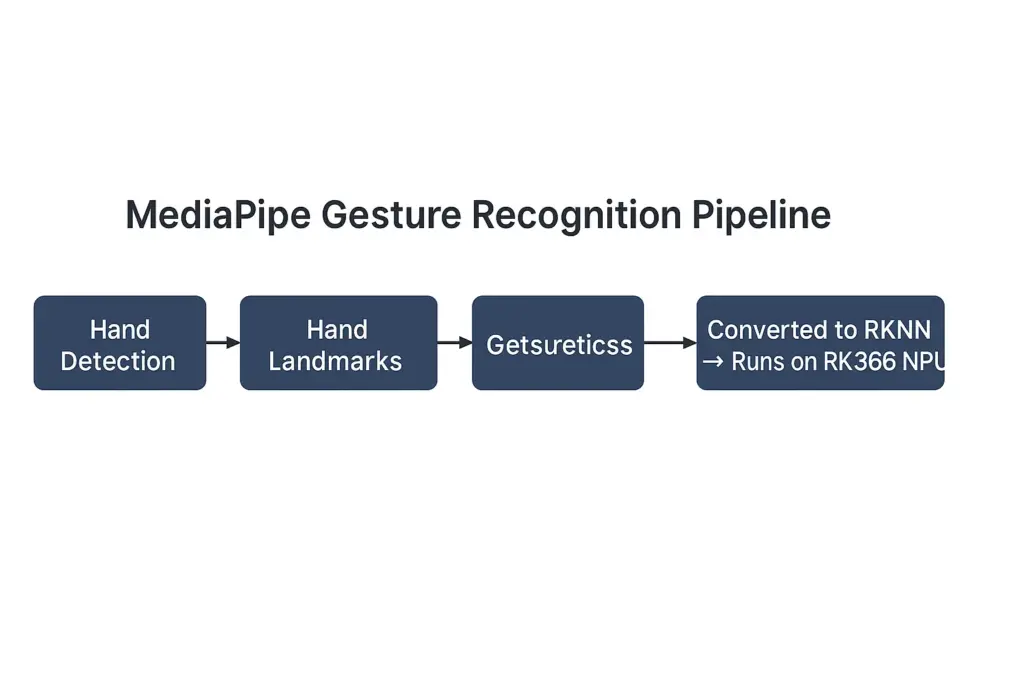
MediaPipe Gesture recognition is an important human–computer interaction technique in computer vision. Google’s MediaPipe offers a complete Gesture Recognizer pipeline, which includes four stages: hand detection, hand landmark detection, embedding generation, and gesture classification. This enables real-time, end-to-end gesture recognition across many applications.
However, MediaPipe is primarily optimized for PC CPU, NVIDIA GPU, and Android GPU environments. Running the same models directly on embedded SoCs such as Rockchip RK3566 or RK3588 leads to inefficient performance.
To bring MediaPipe Gesture Recognition to embedded hardware, each model must be converted to RKNN format. This step is part of the overall RKNN Conversion workflow required to run MediaPipe models efficiently on the RK3566 NPU. Rockchip provides the RKNN Toolkit 2, which converts mainstream deep-learning models (TFLite, ONNX, Caffe, etc.) into the .rknn format. These models can then run on the NPU for hardware acceleration. With this toolchain, we can migrate the MediaPipe gesture recognition pipeline onto RK3566 and achieve low-power, high-performance edge inference.
Model Components in MediaPipe Gesture Recognizer
The MediaPipe Gesture Recognition pipeline is built from four separate TFLite models. The gesture_recognizer.task file is not a single model. It is a Task Bundle that includes several .tflite models and configuration files. After unpacking it, you will see:
hand_landmarker.task
- hand_detector.tflite — Palm/hand detection
- hand_landmarks_detector.tflite — 21 hand keypoints
hand_gesture_recognizer.task
- gesture_embedder.tflite — Converts keypoints into embedding vectors
- canned_gesture_classifier.tflite — Classifies hand gestures
Together, they form this pipeline:
Hand Detection → Landmark Detection → Embedding → Gesture Classification
Why convert them one by one?
RKNN Toolkit 2 cannot parse .task files.
So we must extract the four TFLite models and convert each to .rknn.
During inference, the four RKNN models must be called sequentially, following MediaPipe’s original order, to reproduce the complete gesture pipeline.
Summary of migration steps
- Unpack
.task→ extract.tflitemodels - Convert each TFLite model →
.rknn - Build the pipeline on RK3566 → run full gesture recognition
Model Conversion Workflow
During conversion, each MediaPipe Gesture Recognition model must preserve its original preprocessing rules, or the output will drift.
---
title: "MediaPipe to RKNN: Model Conversion and Pipeline"
---

graph TD

subgraph A["Stage A — Unpacking (PC)"]
A0["gesture_recognizer.task"]
A1["Extract 4 TFLite Models"]
A2["hand_detector.tflite"]
A3["hand_landmarks_detector.tflite"]
A4["gesture_embedder.tflite"]
A5["canned_gesture_classifier.tflite"]
A0 --> A1
A1 --> A2
A1 --> A3
A1 --> A4
A1 --> A5
end

subgraph B["Stage B — Conversion (PC)"]
B0["Set rknn.config (target='rk3566', w8a8)"]
B1["Provide dataset.txt for image models"]
B2["load_tflite → build → export_rknn"]
end

A2 --> B
A3 --> B
A4 --> B
A5 --> B

B --> C2["hand_detector.rknn"]
B --> C3["hand_landmarks_detector.rknn"]
B --> C4["gesture_embedder.rknn"]
B --> C5["canned_gesture_classifier.rknn"]

subgraph C["Stage C — Deployment (RK3566)"]
D0["Input Frame"]
D1["Run 4 RKNN Models Sequentially"]
D2["Gesture Output"]
D0 --> D1 --> D2
end

C2 --> C
C3 --> C
C4 --> C
C5 --> C
Step 1. Install RKNN Toolkit 2
Install on Windows/Linux x86_64 (Mac requires VM/container):
pip install rknn-toolkit2Recommended Python version: 3.6–3.10.
Version 2.3.2 is widely used.
Step 2. Prepare the Four TFLite Models
Extract these from the task bundle:
- hand_detector.tflite
- hand_landmarks_detector.tflite
- gesture_embedder.tflite
- canned_gesture_classifier.tflite
Step 3. Write the Conversion Script
Each model inside the MediaPipe task file must be converted from TFLite to RKNN before it can run on the RK3566 NPU.
Important: In recent RKNN Toolkit versions, you must call rknn.config() before load_tflite().
Template conversion script
from rknn.api import RKNN

def convert_model(tflite_file, rknn_file, is_image_model=True):
    rknn = RKNN()

    # Configuration
    if is_image_model:
        rknn.config(
            mean_values=[[0, 0, 0]],
            std_values=[[255, 255, 255]],
            target_platform='rk3566',
            quantized_dtype='w8a8'
        )
    else:
        rknn.config(
            target_platform='rk3566',
            quantized_dtype='w8a8'
        )

    # Load TFLite
    rknn.load_tflite(model=tflite_file)

    # Build model
    if is_image_model:
        rknn.build(do_quantization=True, dataset='dataset.txt')
    else:
        rknn.build(do_quantization=False)

    # Export
    rknn.export_rknn(rknn_file)
    rknn.release()


# Convert all models
convert_model('hand_detector.tflite', 'hand_detector.rknn', True)
convert_model('hand_landmarks_detector.tflite', 'hand_landmarks_detector.rknn', True)
convert_model('gesture_embedder.tflite', 'gesture_embedder.rknn', False)
convert_model('canned_gesture_classifier.tflite', 'canned_gesture_classifier.rknn', False)
Common Errors and Fixes
1. E config: Invalid quantized_dtype ‘asymmetric_quantized-u8’
- Cause: RKNN Toolkit 2.3.2 no longer supports this dtype.
- Fix: Use
quantized_dtype='w8a8'.
2. E load_tflite: Please call rknn.config first!
- Cause: Incorrect function order.
- Fix: Always call
config()beforeload_tflite().
3. E build: Dataset file dataset.txt not found!
- Cause: Quantization requires a calibration dataset.
- Fix (choose one):
- Prepare
dataset.txtwith RGB image paths - Disable quantization (
do_quantization=False)
4. RKNN file is empty
- Cause: build() failed.
- Fix: Check build logs, fix the dataset or parameters.
If you are also working with object detection models, see our guide on how to run YOLOv8 on the RK3566 NPU using RKNN Toolkit 2.
Building the Full Gesture Pipeline on RK3566
When running MediaPipe Gesture Recognition on the RK3566 NPU, the four RKNN models must be executed in sequence.
1) Data Flow (RKNN version)
Frame → hand_detector.rknn → box
    → crop/normalize ROI → hand_landmarks_detector.rknn → 21 keypoints
        → flatten/normalize → gesture_embedder.rknn → embedding
            → canned_gesture_classifier.rknn → gesture ID
Note:
Keep the preprocessing steps the same as those of MediaPipe (RGB, 0–1 normalization, input sizes, vector models take float32 directly, etc.).
Single-Image Inference Example (Minimal Working Path)
This example demonstrates how MediaPipe Gesture Recognition can be executed on RK3566 using four independent RKNN models.
Note: Different versions of the hand detector and landmark models may output different formats.
Some return multiple boxes and scores, while others output center + size.
This example shows a common parsing template.
If your model behaves differently, print the output shapes and adjust accordingly.
import cv2, numpy as np
from rknn.api import RKNN

# ========== Utility functions ==========
def to_rgb_norm(img_bgr, size):
    img = cv2.cvtColor(img_bgr, cv2.COLOR_BGR2RGB)
    img = cv2.resize(img, size)
    img = img.astype(np.float32) / 255.0
    return img

def crop_by_box(img_bgr, box_xyxy, pad=0.1):
    h, w = img_bgr.shape[:2]
    x1, y1, x2, y2 = box_xyxy
    # Add padding to avoid tight crops
    cx = (x1 + x2) / 2; cy = (y1 + y2) / 2
    bw = (x2 - x1); bh = (y2 - y1)
    bw *= (1 + pad); bh *= (1 + pad)
    x1 = max(0, int(cx - bw/2)); x2 = min(w, int(cx + bw/2))
    y1 = max(0, int(cy - bh/2)); y2 = min(h, int(cy + bh/2))
    return img_bgr[y1:y2, x1:x2].copy(), (x1, y1, x2, y2)

def norm_landmarks_to_roi_xy(lm_21x2, roi_xyxy):
    x1, y1, x2, y2 = roi_xyxy
    rw = x2 - x1
    rh = y2 - y1
    # Convert normalized ROI coordinates (0–1) back to image coordinates
    pts = []
    for i in range(21):
        x = x1 + lm_21x2[i,0] * rw
        y = y1 + lm_21x2[i,1] * rh
        pts.append([x, y])
    return np.array(pts, dtype=np.float32)

# ========== Load models ==========
det = RKNN(); det.load_rknn('hand_detector.rknn'); det.init_runtime()
lm  = RKNN(); lm.load_rknn('hand_landmarks_detector.rknn'); lm.init_runtime()
emb = RKNN(); emb.load_rknn('gesture_embedder.rknn'); emb.init_runtime()
clf = RKNN(); clf.load_rknn('canned_gesture_classifier.rknn'); clf.init_runtime()

# ========== Run inference on one image ==========
img_path = 'test.jpg'
ori = cv2.imread(img_path)
H, W = ori.shape[:2]

# 1) Hand detection
det_in_size = (224, 224)
det_in = to_rgb_norm(ori, det_in_size)
det_in = np.expand_dims(det_in, 0)  # NHWC
det_out = det.inference([det_in])

# ★★ Print det_out to confirm its real structure, then adjust parsing accordingly ★★
# Assume format is [N, 6]: x1, y1, x2, y2, score, class (normalized coordinates)
boxes = det_out[0]
boxes = np.array(boxes).reshape(-1, 6)  # Adjust if needed
boxes = boxes[boxes[:,4] > 0.5]         # Score threshold
if len(boxes) == 0:
    print('No hand detected'); exit(0)

# Choose the box with the highest confidence
best = boxes[np.argmax(boxes[:,4])]
x1, y1, x2, y2 = best[:4]
x1, y1, x2, y2 = int(x1*W), int(y1*H), int(x2*W), int(y2*H)

roi, roi_xyxy = crop_by_box(ori, (x1,y1,x2,y2), pad=0.15)

# 2) Landmark detection
lm_in_size = (224, 224)
lm_in = to_rgb_norm(roi, lm_in_size)
lm_in = np.expand_dims(lm_in, 0)
lm_out = lm.inference([lm_in])

# ★★ Print lm_out to confirm shape ★★
# Common outputs: [1,21,3] or [1,63] — x,y normalized to ROI
lm_arr = lm_out[0]
lm_arr = np.array(lm_arr).reshape(21, -1)
lm_xy_roi = lm_arr[:,:2]
lm_xy = norm_landmarks_to_roi_xy(lm_xy_roi, roi_xyxy)

# 3) Embedding (flatten 21×2 → 42)
vec_42 = lm_xy_roi.reshape(-1).astype(np.float32)
vec_42 = np.expand_dims(vec_42, 0)
emb_out = emb.inference([vec_42])
embedding = np.array(emb_out[0]).astype(np.float32).reshape(-1)

# 4) Classification
logits = clf.inference([np.expand_dims(embedding,0)])[0]
probs = np.array(logits).reshape(-1)
gid = int(np.argmax(probs))
print('Gesture ID:', gid, 'score:', float(probs[gid]))

# Visualization
for (x,y) in lm_xy.astype(int):
    cv2.circle(ori, (x,y), 2, (0,255,0), -1)
cv2.rectangle(ori, (x1,y1), (x2,y2), (0,128,255), 2)
cv2.putText(ori, f'G:{gid} {probs[gid]:.2f}', (x1, max(0,y1-8)),
            cv2.FONT_HERSHEY_SIMPLEX, 0.6, (0,0,255), 2)
cv2.imwrite('result.jpg', ori)

# Release
det.release(); lm.release(); emb.release(); clf.release()
print('Saved result.jpg')
Two places require printing before adjusting the logic:
① The shape/meaning of
det_out(some models output center + size; some output absolute or normalized coordinates).② The shape/meaning of
lm_out(some return 63 dims; some include z/visibility).Provide your real shapes and I can produce an exact aligned version.
Real-Time Camera Demo (OpenCV + RKNN)
This version handles single-hand recognition.
To support multiple hands, loop through all valid detection boxes.
import cv2, time, numpy as np
from rknn.api import RKNN

def to_rgb_norm(img, size):
    img = cv2.cvtColor(img, cv2.COLOR_BGR2RGB)
    img = cv2.resize(img, size)
    return (img.astype(np.float32) / 255.0)[None, ...]  # NHWC

def main():
    det = RKNN(); det.load_rknn('hand_detector.rknn'); det.init_runtime()
    lm  = RKNN(); lm.load_rknn('hand_landmarks_detector.rknn'); lm.init_runtime()
    emb = RKNN(); emb.load_rknn('gesture_embedder.rknn'); emb.init_runtime()
    clf = RKNN(); clf.load_rknn('canned_gesture_classifier.rknn'); clf.init_runtime()

    cap = cv2.VideoCapture(0)
    det_size = (224,224); lm_size = (224,224)

    while True:
        ok, frame = cap.read()
        if not ok: break
        H, W = frame.shape[:2]

        t0 = time.time()
        det_out = det.inference([to_rgb_norm(frame, det_size)])

        # ★★ Parse det_out to obtain the best hand bounding box (x1, y1, x2, y2) — adjust as in the previous example. ★★
        boxes = np.array(det_out[0]).reshape(-1, 6)
        boxes = boxes[boxes[:,4] > 0.5]
        if len(boxes) == 0:
            cv2.putText(frame, 'No hand', (10,30), 0, 1, (0,0,255), 2)
            cv2.imshow('RKNN Gesture', frame)
            if cv2.waitKey(1) == 27: break
            continue
        best = boxes[np.argmax(boxes[:,4])]
        x1, y1, x2, y2 = (best[0]*W, best[1]*H, best[2]*W, best[3]*H)
        x1, y1, x2, y2 = map(int, [x1,y1,x2,y2])
        x1 = max(0, x1); y1 = max(0, y1); x2 = min(W, x2); y2 = min(H, y2)

        roi = frame[y1:y2, x1:x2].copy()
        lm_out = lm.inference([to_rgb_norm(roi, lm_size)])

        # ★★ Parse lm_out to get the 21×2 normalized coordinates — adjust as in the previous example. ★★
        lm_arr = np.array(lm_out[0]).reshape(21, -1)
        lm_xy_roi = lm_arr[:,:2]
        # Convert back to full-image coordinates
        rw, rh = (x2-x1), (y2-y1)
        lm_xy = np.zeros((21,2), np.float32)
        lm_xy[:,0] = x1 + lm_xy_roi[:,0] * rw
        lm_xy[:,1] = y1 + lm_xy_roi[:,1] * rh

        # embed & classify
        vec_42 = lm_xy_roi.reshape(1,-1).astype(np.float32)
        embedding = np.array(emb.inference([vec_42])[0]).reshape(1,-1).astype(np.float32)
        probs = np.array(clf.inference([embedding])[0]).reshape(-1)
        gid = int(np.argmax(probs))

        # draw
        for (x,y) in lm_xy.astype(int):
            cv2.circle(frame, (x,y), 2, (0,255,0), -1)
        cv2.rectangle(frame, (x1,y1), (x2,y2), (0,128,255), 2)
        fps = 1.0 / (time.time()-t0 + 1e-6)
        cv2.putText(frame, f'G:{gid} p:{probs[gid]:.2f} FPS:{fps:.1f}', (10,30), 0, 1, (0,255,255), 2)

        cv2.imshow('RKNN Gesture', frame)
        if cv2.waitKey(1) == 27: break

    cap.release(); cv2.destroyAllWindows()
    det.release(); lm.release(); emb.release(); clf.release()

if __name__ == '__main__':
    main()
Practical Optimization Tips
Optimizing preprocessing and quantization improves the accuracy of MediaPipe Gesture Recognition when deployed on RK3566.
- Quantization dataset:
Prepare 100–300 RGB images of hands with varied skin tones, lighting, and backgrounds for detector and landmark models.
This greatly improves INT8 stability. - Input size:
Use the exact input resolution defined in the TFLite models (check with Netron). - Consistent preprocessing:
Use the same RGB layout and 0–1 normalization (mean=0, std=255) as in conversion.
Avoid mismatches between training and runtime pipelines. - ROI affine alignment:
If the detector outputs rotated boxes or the model expects upright palms, apply optional rotation alignment before cropping. - Pipeline optimization:
Use frame-to-frame tracking to reduce detector frequency (run detector once every N frames, run landmarks in between). - Multi-hand support:
For each box above the threshold, run the remaining three stages independently.
Limit the max number of hands to keep real-time performance. - Threading / CPU pinning:
On RK3566, use multi-threading to separate camera capture, NPU inference, and drawing for smoother performance.
Quick Troubleshooting Table
| Issue | Cause | Quick Check | Fix |
|---|---|---|---|
| No boxes / unstable boxes | Quantization drift | Print det_out | Fix mean/std; improve dataset |
| Wrong landmark positions | ROI mapping error | Visualize ROI + points | Fix ROI and normalization |
| Classifier always same label | Wrong embedding input | Print vec_42 | Normalize landmarks as MediaPipe |
| Low FPS | Full pipeline each frame | Check time | Reduce detector freq |
| Export failed | Missing dataset | Check logs | Add dataset or use w8a8 |
MediaPipe’s gesture embedder often applies centering, scale normalization, and mirroring to keypoints. Reproduce these steps when needed.
Final Thought
By converting the four MediaPipe gesture-recognition submodels into RKNN models and running them sequentially on RK3566, you can build a low-power, real-time gesture recognition system.
The key is to maintain identical preprocessing, provide a good quantization dataset, and apply real-world engineering optimizations such as lowering detection frequency or using multithreading.
This guide gives you a complete path from MediaPipe → RKNN → RK3566 edge deployment.
| Dimension | Value |
|---|---|
| Hardware Cost | RK3566 is low-cost and low-power, no GPU needed |
| Deployment Difficulty | RKNN handles model conversion; no algorithm rewrite |
| Functional Value | Enables real-time gesture recognition |
| Business Value | High-value features on low-cost hardware; faster time-to-market |
This shows the strong combination of low-cost hardware + high-value CV capability, enabling real deployment in smart home, retail, education, and more.
For developers deploying multiple AI models on RK3566, we also provide a complete tutorial on running YOLOv8 with RKNN on the same platform.
FAQ
1. What models need to be converted when deploying hand-related pipelines on RK3566?
You must convert each model used in the pipeline—detection, landmark extraction, embedding, and classification—into the .rknn format so they can run efficiently on the RK3566 NPU.
2. What are the most common issues when converting models to RKNN?
Typical issues include incorrect input size, mismatched normalization, unsupported quantization settings, missing calibration images, or incorrect model ordering during execution.
3. What is the correct execution order for hand-analysis pipelines on RK3566?
The standard sequence is:
Detection → Landmark Extraction → Embedding → Classification.
Running them in the wrong order causes incorrect outputs or reduced accuracy.
4. Can RK3566 achieve real-time performance for hand-analysis workloads?
Yes. With proper preprocessing, model conversion, and optimization, RK3566 can achieve real-time performance while maintaining low power consumption, making it well-suited for embedded AI applications.